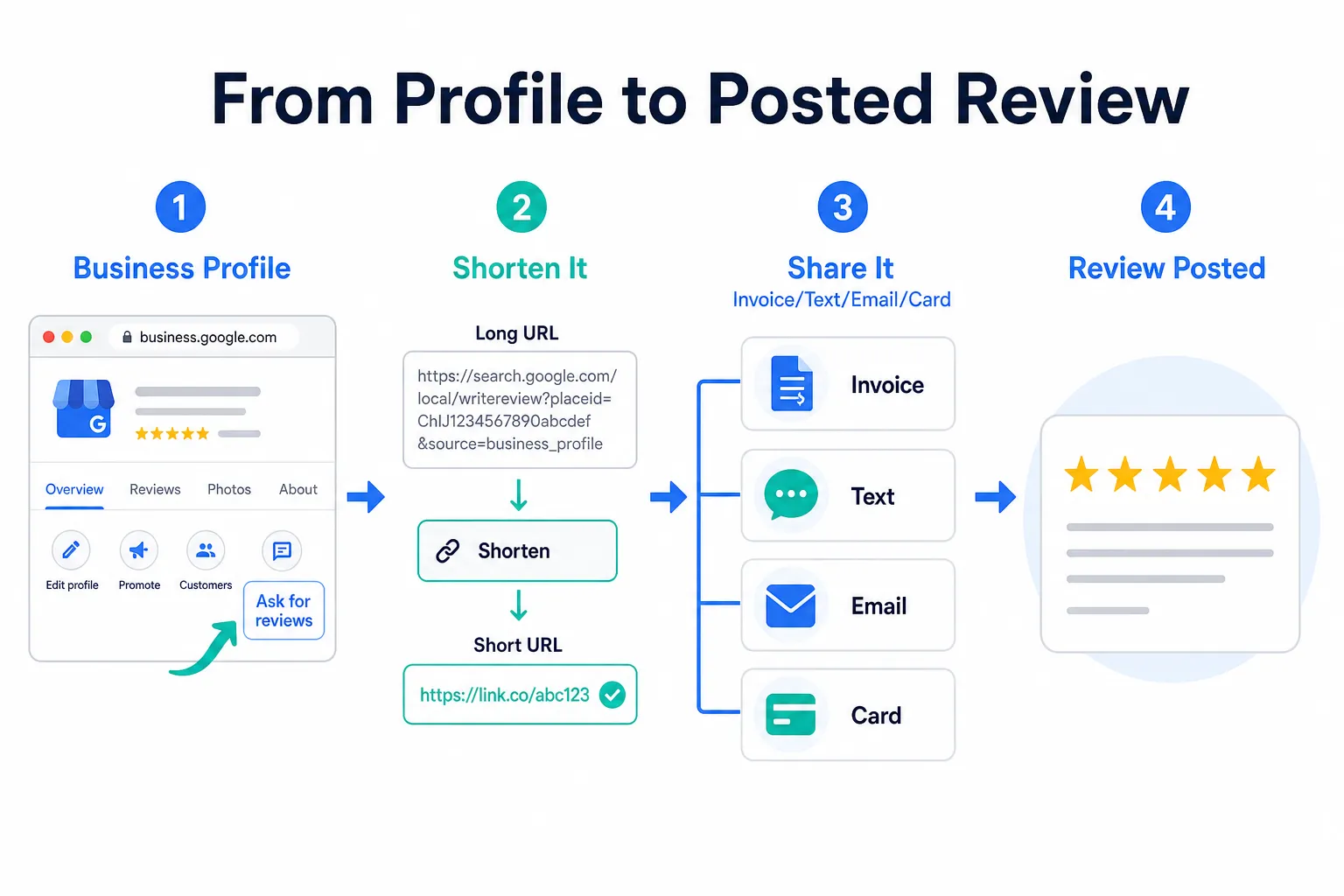
TLDR: Your Google review link lives inside your Google Business Profile. You can grab it in about two minutes, shorten it, and paste it anywhere customers can see it. That is the whole job. The rest of this article is about doing it right so reviews actually come in, not just sitting on a link you never use.
Where to Find Your Google Review Link
Open a browser and go to business.google.com. Sign in with the Google account tied to your business. If you manage more than one location, pick the right one from the dashboard.
Once you are inside your profile, look for a button that says 'Ask for reviews' or 'Get more reviews.' Google moves things around occasionally, but it is usually visible right on the home screen of the profile manager. Click it, and a short link appears. That is your google review link.
Copy that link and save it somewhere permanent, like a notes doc or your email drafts, before you do anything else. You will use it a lot.
What If You Cannot Find Your Business Profile?
Some contractors have a profile they never claimed. Google sometimes creates one automatically based on public records or customer activity. If you search your business name on Google and a knowledge panel shows up on the right side, that profile exists whether you claimed it or not.
Claim it by clicking 'Own this business?' on that panel and following the verification steps. Google typically verifies by postcard, phone call, or video. The process takes a few days at most.
If no profile exists at all, you can create one at business.google.com. Fill in your trade, your service area, and your contact info. Once verified, the review link becomes available. Do not skip this step. An unclaimed profile is a missed opportunity every single week.
Shortening the Link So It Is Actually Usable
The raw link Google gives you is long and ugly. Pasting it into a text message or a handwritten note is not realistic.
Use a free link shortener to turn it into something clean. Bit.ly and TinyURL are two commonly used options. Paste your google review link in, and you get a short version you can actually send. Some contractors create a custom short link through their website domain if they have one, which looks more professional.
Whatever format you use, test it on your own phone before you send it to a single customer. Broken links kill the whole effort.
Where to Put Your Google Review Link
The link does nothing sitting in a doc. Here is where it earns its keep.
In your follow-up texts and emails after a job. Most customers who would have left a review just never thought to. A direct link removes every excuse. On your invoices. Whether you use paper or software, adding a line at the bottom with something like 'Happy with the work? Leave us a quick review' plus the link costs you nothing. On your email signature. Every message you send is a touchpoint. On a card you leave behind at the job site. A small printed card with a QR code that points to your google review link works well, especially for customers who do not respond to texts.
You can also add the link to your estimates. Customers who get a quote and then hire you are already warm. Seeing the link early plants the seed. If you want a cleaner system for sending review requests automatically after a job, that is a separate conversation, but the link is the starting point either way.
What You Cannot Do With That Link
Google has rules, and violating them can get your profile suspended or your reviews wiped. That is a real consequence worth understanding.
You cannot offer anything in exchange for a review, a discount, a gift card, cash, nothing. This is called incentivizing reviews, and Google prohibits it. You also cannot ask for reviews only from customers you know are happy, which is called review gating. The idea of filtering out unhappy customers before sending the link might sound smart, but Google considers it a manipulation of their system.
Ask every customer the same way, without filtering, without bribing, and without pressuring anyone to say something specific. Keep it simple: 'We would appreciate an honest review if you have a minute.'
My Take
My advice: get the link today, shorten it, and put it in three places before the week is out. Your invoice, your follow-up text, and your email signature. That alone will get you more reviews than most of your competitors are collecting.
The contractors I talk to who struggle with reviews almost always have the same problem. They mean to ask but never do, or they ask verbally and the customer forgets. The link removes the memory problem. It puts the ask in writing with a single tap to complete the action.
The best moment to send the link is within a day or two of finishing the job, while the work is still fresh in the customer's mind. Waiting a week means waiting too long. A lot of the review collection process can run on its own if you set it up right, but even doing it manually beats not doing it at all.
Common Questions
Do I need a website to have a Google review link? No. Your Google Business Profile is separate from your website. You can have a profile and a review link with no website at all.
Can I use the same link forever? Yes. The link does not expire. Save it once and reuse it as many times as you want.
What if a customer says they cannot leave a review? Sometimes Google blocks reviews from accounts with little activity, or the customer does not have a Google account. There is nothing you can do about that specific case. Just keep asking other customers. Volume is your friend here.