TLDR: A google review request template works when it sounds like you wrote it yourself, not a robot. The safest approach is short, specific, and sent right after the job. Here is what actually gets replies from homeowners and property managers.
Why most review request templates get ignored
Most contractors send the same thing everyone else sends. 'We value your feedback. Please take a moment to leave us a review.' It reads like a bank notification. The homeowner skips it without thinking twice.
The problem is not asking. Asking is fine. The problem is asking in a way that sounds like it came from a queue. The single fastest way to get a Google review is to make the customer feel like you remembered them specifically, not just their invoice number.
Think about the jobs you have closed recently. You know which ones went well. You know which customer shook your hand at the end and said they would refer you. Those are the ones to reach out to first, and those are the ones who deserve a message that sounds like you.
The anatomy of a google review request template that gets a response
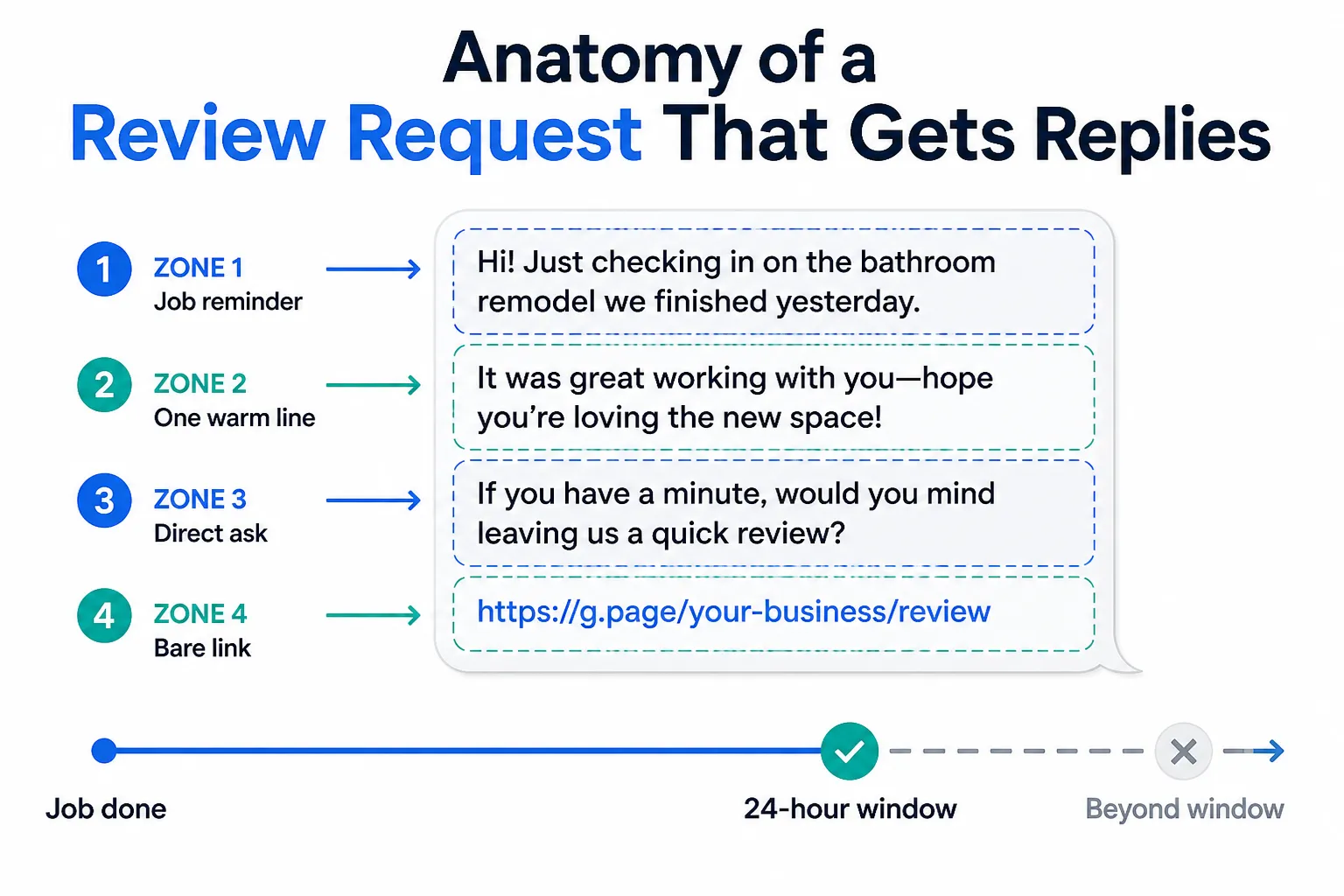
A message that works has three parts. First, a one-line reminder of the specific job. Second, a genuine reason you are reaching out. Third, a direct link to your Google profile, nothing else.
No paragraph about your company history. No list of services. No 'as a valued customer.' Just the job, the ask, and the link. Keep it under six sentences.
Here is the structure broken down:
- Name the job or the address ('the deck we finished on Maple Street')
- One sentence saying the work is done and you hope they are happy
- One direct ask for the review, with the link on its own line
- Optional: one short line saying it takes less than a minute
That is it. Anything longer and you are writing for yourself, not for the customer.
Four templates you can adapt today
These are written for text message or email. Pick the one that fits how you communicate with customers. Change the name and the job detail. Do not overthink it.
Template 1, text message, right after completion: Hey [Name], just wrapped up the [job type] at your place. Hope everything looks exactly how you pictured it. If you have a minute, a Google review means a lot to a small operation like ours. [your Google review link]
Template 2, email, same day or next morning: Subject: Quick question about your [job type]
Hi [Name],
We finished up at [address or project description] and I wanted to make sure you are happy with how it turned out. If anything needs attention, just reply here.
If everything looks good, leaving us a Google review is the best way to help us out. It takes about a minute. [your Google review link]
Thanks, [Your name]
Template 3, text message, following up on a past job: Hey [Name], [Your name] here from [Company]. We did your [job type] back a while ago. Hope it is holding up well. If you ever have a second, a Google review genuinely helps us get more work. [your Google review link]
Template 4, for a property manager you work with regularly: Hi [Name], I know you are busy. We just finished [address or project]. If it was smooth like usual, a quick Google review from you would help us a lot with new clients. No rush. [your Google review link]
Notice what all four have in common. They use the customer's name. They mention the actual job. They do not beg. And they give a clear, frictionless next step.
Timing matters more than wording
You can have the best template in the world. Send it three weeks after the job and the customer barely remembers you. Send it the same day the job is done and they still have the fresh feeling of a clean result.
The window that gets the most responses is within 24 hours of project completion, while your crew is still on their radar.
If you are managing multiple jobs, that window closes fast. A customer who loved you on Tuesday is a little less warm by Friday. By the following week, life has moved on and you are just another notification.
That is the real case for automating Google review requests, not because automation is magic, but because timing is hard to maintain manually when you are running jobs, managing subs, and chasing down material deliveries all at once.
What to do when someone leaves a bad review
This is not directly about templates, but it comes up every time this subject does. If you are actively asking for reviews, you will occasionally get a negative one. That is normal.
Respond to it publicly, calmly, and briefly. Acknowledge what they said. Offer to make it right offline. Do not argue. Most potential customers reading your reviews are not looking for perfection. They are looking for how you handle problems.
One measured response to a complaint often does more for your reputation than ten five-star reviews. It shows you are a real business with a real person behind it.
Also, Google has rules about review solicitation. You cannot offer incentives for reviews, and you cannot ask people to change negative reviews. Those rules apply across the board. If you are using any platform or tool to send requests, make sure it follows Google's policies. When in doubt, keep it simple and honest.
My take
My advice: stop trying to find the perfect template and start sending something that sounds like you. I have seen contractors overthink this for months and send nothing. Meanwhile, the guy down the road with a shorter template and better timing is collecting reviews every week.
The template is not the bottleneck. Consistency is.
Pick one of the formats above. Adapt it to how you actually talk. Send it within 24 hours of every job that went well. Do that for a month and see what happens to your Google profile.
If you find yourself forgetting to send it, or skipping it when things get busy, that is the moment to look at how Google review requests can run automatically after a job closes. Not because you are lazy. Because you are running a business.
Common questions
Can I text customers asking for a Google review? Yes, and text often outperforms email for this. Keep it short. Include the direct link. Do not text more than once about the same job.
Should I ask every customer or just happy ones? Start with the ones you are confident were happy. Over time, asking consistently after every completed job is fine. Most customers who were satisfied simply forget to leave a review unless you ask.
What is the direct Google review link and how do I get it? Search your business on Google. In your Google Business Profile dashboard there is an option to get a shareable link that takes customers directly to the review form. Use that link, not your general profile URL. It removes extra steps and people actually complete it.