TLDR: A solid invoice template covers your legal bases, matches how you actually work, and takes under three minutes to fill out. If it takes longer than that, you will stop using it. Here is how to find one built for the trades, not for a desk job.
Most contractors pick an invoice template in five minutes and regret it in five months. The fields do not match how they quote. The layout confuses homeowners. The notes section is missing. Then they go back to texting payment amounts, and the money gets slow.
This is worth getting right once.
Why Most Generic Invoice Templates Fail Tradespeople
A generic template was built for a consultant billing by the hour. You are not a consultant. You have materials, labor, change orders, subcontractors, and sometimes job-site photos to reference. A template that does not have room for those things forces you to improvise every time.
The biggest failure point is not the design, it is the workflow. If filling out the template requires you to sit at a computer after a ten-hour day, it does not matter how beautiful it looks. It will collect dust.
The trades need templates that:
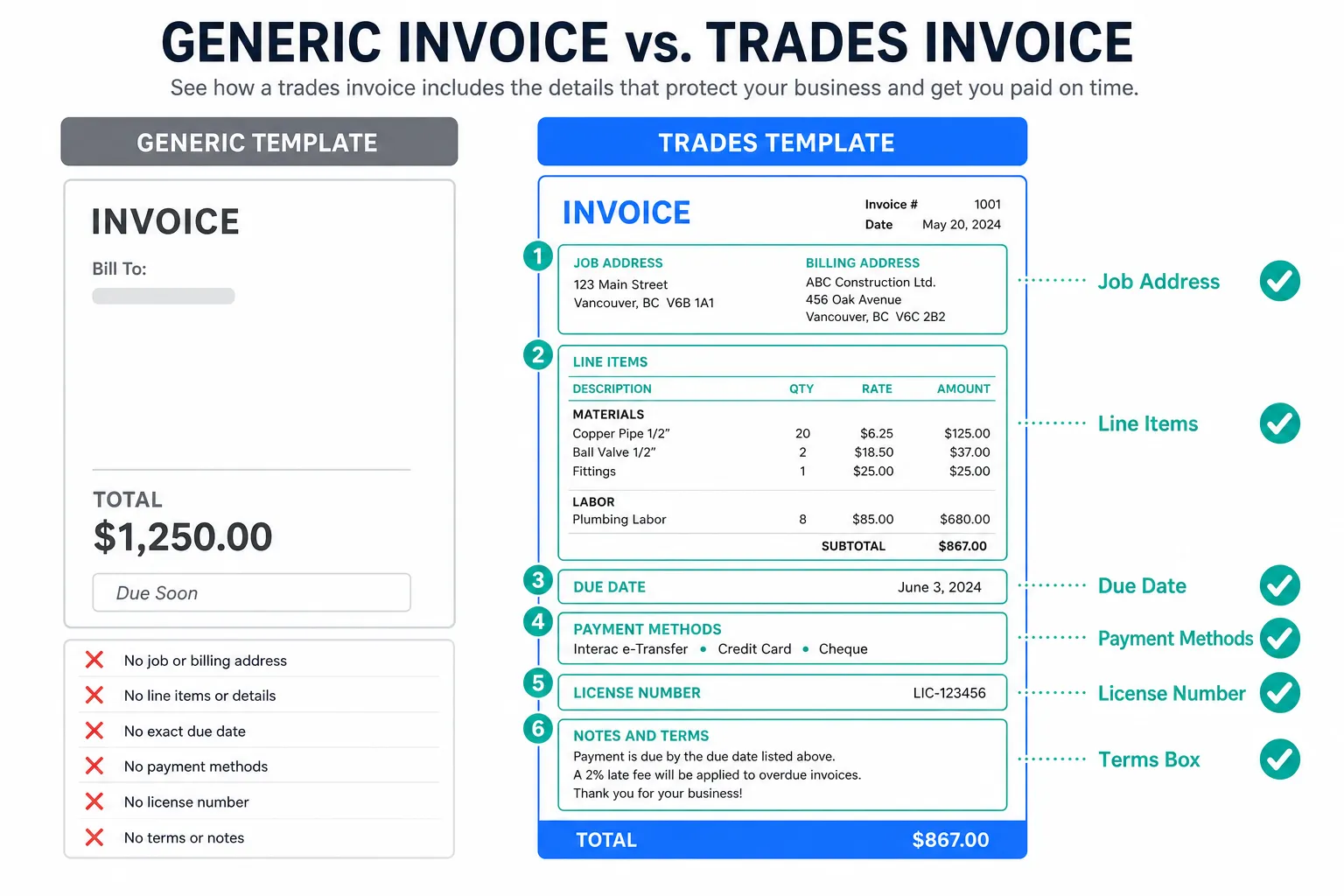
- Separate materials and labor clearly
- Have a line for change orders or extras
- Include a payment terms field that is hard to miss
- Leave room for a job address that is different from the billing address
- Show your license number if your state requires it on invoices (and many do, check your state's contractor licensing board)
That last point matters. Whether your state requires a license number on invoices varies. Some states are strict, some are not. Do not guess. Look it up for your state specifically.
Here is what free invoice templates almost always get wrong, field by field.
The Five Fields That Separate a Good Invoice Template from a Bad One
You can judge a template in about ninety seconds if you know what to look for. Run through this list before you commit to one.
A clear due date field, not just 'net 30,' is the difference between getting paid on time and chasing invoices. Homeowners do not know what net 30 means. Write a calendar date.
The five fields worth checking:
- Itemized line items with room for description, quantity, unit price, and total
- A job address field separate from the client's billing address
- A payment methods section (check, ACH, credit card, whatever you accept)
- A notes or terms section for your warranty language or deposit policy
- Your business name, phone, and email in a spot that is easy to find
One more thing people forget: a unique invoice number. Sounds obvious, but when you are using a copied Word file or a downloaded PDF, numbering gets messy fast. Skipped numbers, duplicate numbers, and no numbers at all make your books a headache come tax time.
Paper, PDF, Word, or Digital: Which Invoice Template Format Actually Works
Paper works until it gets lost in the truck. A PDF is fine if you have a system for storing it and a way to send it fast. Word and Excel templates are free and flexible, but they are also slow to fill in and easy to break if you accidentally overwrite a formula.
The format that gets used is the one that costs you the least friction on a tired Tuesday afternoon. If pulling out a laptop is one step too many, you will skip it.
Digital tools that let you build an invoice from your phone, or even by talking out loud, have become practical for one-person and small crews. If you have not tried a voice-based invoice generator, it is worth a look, especially if you are finishing jobs at dusk and do not want to type.
Whatever format you choose, make sure the finished invoice looks professional. That means your logo if you have one, consistent fonts, and numbers that line up. A messy invoice signals a messy business, and some property managers will slow-walk payment on that alone.
What Your Invoice Template Should Say About Payment Terms
Payment terms are where most tradespeople leave money on the table. They write the number and hope for the best. The invoice template should do the work of setting expectations before there is a conversation about money.
Spell out the late fee policy, the accepted payment methods, and the exact due date every single time. Whether you can legally charge a late fee, and how much, varies by state. Check what your state allows before printing that language on every invoice.
A few things to decide before you lock in your template:
- Do you require a deposit? State it and the amount or percentage.
- What triggers the final invoice, project completion or a specific milestone?
- Do you offer a small discount for early payment? Some contractors find it speeds things up.
- What happens if there is a dispute? A simple line about your process builds confidence.
None of this needs to be legal language. Plain English works better. Homeowners read plain English.
My Take
My advice: stop hunting for the perfect template and start with one that has the five fields above. Customize it once, save it as your master copy, and protect that file like a tool you paid for.
The contractors who get paid fastest are not the ones with the fanciest software, they are the ones who send the invoice the same day the job is done. Speed matters more than design.
If you are already using estimate software to build your quotes, make sure your invoice template is consistent with it. Same logo, same line item structure, same terms. A homeowner who sees continuity from estimate to invoice trusts you more. That trust shortens the payment cycle.
And if you are not following up on unpaid invoices systematically, the best template in the world will not fix your cash flow. Sending the invoice is step one. Following up is the part most people hate and most often skip.
Common Questions
Do I need a specific invoice template for each trade? Not necessarily. A good base template works for most trades. You might want a variation for service calls versus larger projects, since the line items differ. But one solid template, slightly adapted, beats five mediocre ones.
Is a handwritten invoice legal? Generally yes, but it creates problems. Handwriting is hard to read, easy to dispute, and impossible to search later. A typed or digital invoice protects you better if a client ever questions what they were charged for.
How long should I keep my old invoices? This varies. Federal tax guidance suggests several years, but your state may have its own requirements, and certain contractor licensing rules may require longer retention. Ask your accountant for your specific situation. The short answer: keep them longer than you think you need to.