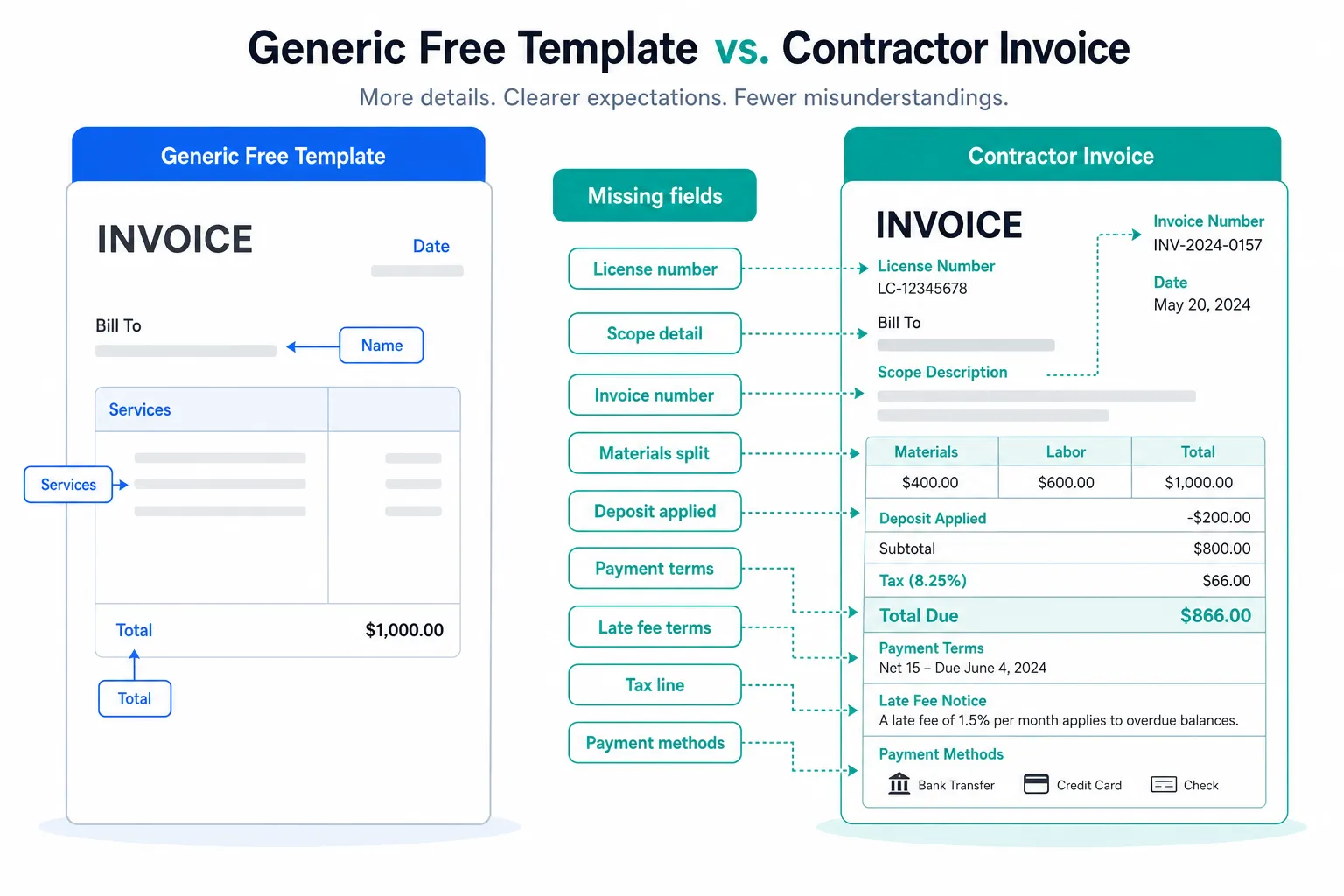
TLDR: Free invoice templates are a decent starting point, but almost every one of them leaves out fields that matter legally and practically for contractors. They are built for generic small businesses, not for tradespeople billing homeowners or property managers. Fix the gaps before you send, and you will save yourself headaches later.
You found a free invoice template on Google. It looks clean. It has your line items, a total, maybe a logo spot. You fill it in, send it as a PDF, and move on to the next job. Simple enough, right?
Not quite. Most free invoice templates were designed for consultants or freelancers, not for someone running a painting crew or replacing HVAC units. The gaps are not obvious at first. They show up later, when a customer disputes a charge, when you need to prove payment terms in a disagreement, or when your accountant asks questions at tax time.
What a free invoice template usually includes
Most templates you find online cover the basics. Your business name, the customer name, a date, a list of services or materials, a subtotal, maybe a tax line, and a total due. That is the skeleton.
Some add a payment due date. Some have a spot for your logo. A few include a notes field at the bottom. But the skeleton is not the whole body, and for a contractor, the missing parts are exactly where disputes start.
These templates were built to be universal. Universal means stripped down. What works for a graphic designer billing a startup does not always work for a roofer billing a homeowner.
The fields free invoice templates almost always leave out
Here is what disappears when a template tries to please everyone:
- Your contractor license number. Many states require this on invoices or contracts for work above a certain value. The threshold varies by state, so check yours. Leaving it off can create problems with licensing boards.
- Your insurance information. Not always legally required on an invoice, but homeowners ask, and having it there prevents back-and-forth.
- A clear scope description. 'Labor' is not a scope. If a customer later says you did not do something, your invoice is your first line of defense.
- Payment terms with teeth. 'Net 30' is not enough. You want late fees stated, and you want them to match what your state allows. Rules on late fee caps vary by state.
- A deposit line if you collected one. Skipping this creates confusion about what the customer still owes.
- Your business address and phone number. Sounds obvious. Generic templates skip it or make it optional.
None of these fields are exotic. Every one of them comes up in real disputes between contractors and customers.
The legal gaps that actually hurt you
Free templates do not know what state you are in. Sales tax rules for labor versus materials differ across states. Some states tax labor on certain trades, others do not. Some have exemptions for residential work. A template that just puts a blank tax line does not tell you anything useful.
If you are invoicing in a state where you need to separately list materials and labor for tax purposes, a combined line item is not just sloppy, it can create real compliance questions.
Mechanic's lien rights are another area where your invoice matters more than most contractors realize. Depending on your state, the language you use on your invoice, the dates you record, and how you document the work can affect your ability to file a lien if a customer does not pay. Again, the rules vary widely by state. But the point is that a generic free invoice template was never built with any of this in mind.
If you want to understand more about protecting your payment rights on the job, getting your invoice structure right from the start is step one.
What contractors actually do wrong with templates
The most common mistake is not the template itself. It is using the same template forever without updating it.
You download a template once. You fill in the name and the numbers each time. You never revisit the structure. Three years later, your business has changed, your services have changed, your state may have updated its licensing requirements, and you are still sending the same 2019 layout.
Other mistakes that come up constantly:
- Listing 'miscellaneous' as a line item. Customers hate it and it invites disputes.
- Sending a template with no invoice number. Tracking payments without sequential numbers is a nightmare at tax time.
- Forgetting to include which payment methods you accept. Do not make the customer guess.
- Using the word 'estimate' and 'invoice' interchangeably in the template filename or header. These are different documents with different legal weight.
The habit of treating an invoice as just a receipt, rather than a document that protects you, is where most contractors lose money quietly.
My take
My advice: use a free invoice template if it gets you started, but treat it as a draft, not a finished product. Go through it field by field and ask yourself what a lawyer or a sharp customer could challenge.
Add your license number. Write out your payment terms explicitly. Break out materials and labor as separate lines. Put a real scope description, not just a job name. Date the invoice correctly and number it.
Most importantly, stop thinking of your invoice as a formality you send after the work is done. It is a document that either protects your business or leaves it exposed, and the difference between those two outcomes is usually a handful of fields.
If you are spending time filling out the same fields over and over in a Word doc, that is a process problem worth solving. A tool that lets you generate invoices quickly by voice can cut that time down significantly without sacrificing the fields that matter.
Common questions
Do I need my contractor license number on every invoice? It depends on your state. Many states require it on contracts and invoices for work above a certain project value, but the rules differ. Check with your state licensing board directly. When in doubt, put it on everything.
Can I charge a late fee if I did not put it in writing? In most states, you can only enforce a late fee if the customer was informed of it beforehand, either on the estimate, the contract, or the invoice itself. Verbal agreements on late fees are hard to enforce. Put the amount and the trigger date in writing on every invoice.
Is a Word or Excel template good enough, or do I need software? A well-built Word or Excel template is fine as long as it includes everything you need. The real issue is consistency. If you are editing a template manually each time, it is easy to accidentally delete a field or send an outdated version. Whatever format you use, lock in the structure so it does not drift.